Best Noise Meter Apps for iPhone & Android in 2024
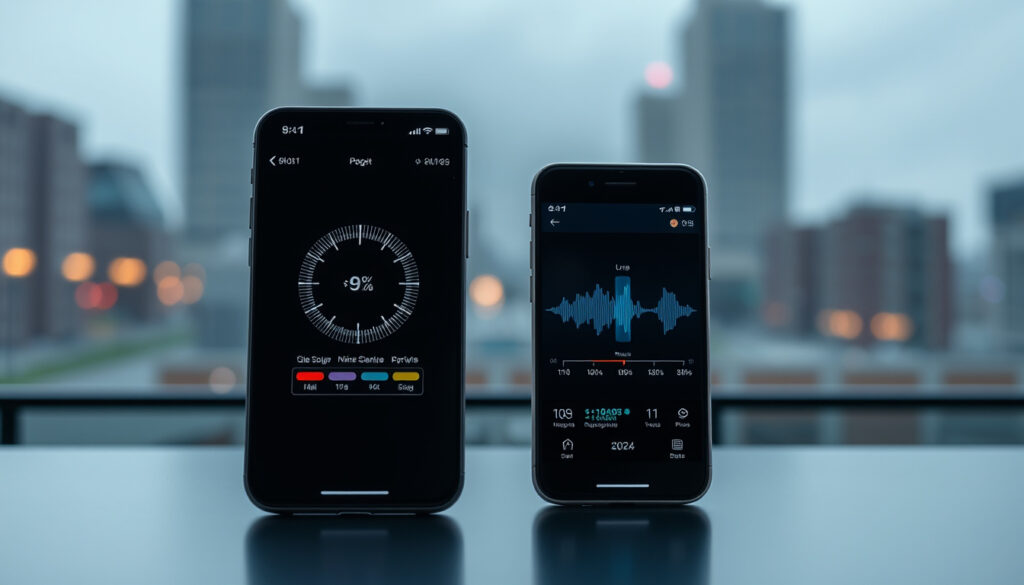
Your smartphone can double as a sound level meter—and increasingly, it does a decent job. Apps ranging from CDC-validated tools to free Android utilities now let anyone check decibel levels without buying a dedicated device. The question is which ones actually deliver on that promise.
Top iPhone App: NIOSH Sound Level Meter · Recommended by CDC: NIOSH SLM · Android Option: Sound Meter & Noise Detector · Accuracy Source: PMC Study · Free iPhone Option: NIOSH App
Quick snapshot
- NIOSH SLM accuracy ±2 dBA (App Store – NIOSH SLM)
- iOS has CDC-validated option; Android does not (CDC NIOSH)
- Decibel X works on both platforms (Soundly Blog)
- Exact accuracy drift over time for each app
- Battery impact comparisons across devices
- Calibration frequency recommendations
- Soundly published 2026 rankings (Soundly Blog)
- NIOSH SLM validation ongoing (CDC NIOSH)
- Continued Android accuracy studies expected
- Potential cross-platform calibration features
| App | Platform | Price | dB Range |
|---|---|---|---|
| NIOSH Sound Level Meter | iOS only | Free | — |
| Decibel X | iOS and Android | Free with IAP | 30-130 dB |
| Decibel Pro | iOS and Android | Free / Paid | — |
| Sound Meter & Noise Detector | Android only | Free with ads | — |
| Too Noisy Pro | iOS | Paid | — |
Which Decibel Meter App is Most Accurate?
Accuracy separates a useful tool from a toy. The CDC’s National Institute for Occupational Safety and Health (NIOSH) developed the NIOSH Sound Level Meter app specifically to meet Type 2 requirements of the IEC 61672:3 standard—using a calibrated external microphone. Testing in NIOSH’s acoustics lab showed accuracy within ±2 dBA (App Store – NIOSH SLM). No other free app carries that level of government validation.
NIOSH for iPhone
- iOS only—no Android version exists
- Free, no ads, no in-app purchases
- Includes LAeq, TWA, Max, Peak, and A/C/Z weighting
- Tracks noise dose percentage over time
- 4.7 App Store rating (Audiology Island)
The catch: you need an iPhone. NIOSH notes that Android-based apps cannot currently be verified for accuracy (CDC NIOSH). That doesn’t mean Android apps are useless—it means their readings lack third-party confirmation.
Decibel X and Alternatives
Decibel X earns consistent mentions as a highly-rated cross-platform option. It measures both dBA and dBC weighting, covers a 30-130 dB range, and provides real-time graphs and average exposure tracking (Sound Relief Hearing Center). The free version offers substantial functionality; the premium tier adds export and frequency analysis capabilities (Echo Barrier Blog).
Soundly’s 2026 rankings list Decibel Pro alongside NIOSH and Decibel X as top picks, with Decibel Pro offering a unique photo/video noise overlay feature (Soundly Blog). However, Decibel Pro’s tier2 confidence means its accuracy claims lack the government validation that NIOSH carries.
For occupational health or legal noise complaints, NIOSH SLM is the only app with verified accuracy. Casual users measuring coffee shop ambiance may find Decibel X perfectly adequate.
Android Accuracy
Android users face a harder verification problem. CDC NIOSH explicitly states that verifying the accuracy of Android-based apps is not currently possible (CDC NIOSH). The Google Play Store offers several options—Sound Meter & Noise Detector (Android-only, with exposure history), Sound Meter (color-coded safety indicators, max 90 dB on some devices), and Decibel (current/min/max with charts)—but none have undergone independent lab testing.
Apps like Sound Meter use A-weighting filters appropriate for human hearing, but the absence of published accuracy studies leaves their readings unverified (Sonus Hearing). Victorian Hearing notes that even older Android apps lack the formal validation iOS options have received (Victorian Hearing).
Can I Measure Noise Levels with My Phone?
Yes—with caveats. Built-in smartphone microphones were designed for voice calls, not acoustic measurement. They have acceptable frequency response for everyday noise assessments but lack the precision of professional instrumentation. For context, OSHA and NIOSH occupational noise standards assume measurement equipment meeting specific accuracy thresholds (CDC NIOSH).
Phone Mic Limitations
- Microphones optimized for speech frequencies (300 Hz – 3.4 kHz)
- Difficulty capturing very low or very high frequencies accurately
- No calibration trace for most consumer devices
- Maximum reliable range typically 90-100 dB without hardware modifications
Calibration Tips
Even NIOSH recommends using a calibrated external microphone for professional applications. Built-in phone mics can be used for screening purposes, but apps like NIOSH SLM flag when readings may be unreliable. For Android apps, there is no standard calibration path (CDC NIOSH).
When to Use Professional Meters
Professional equipment becomes necessary when readings have legal or occupational implications—workplace compliance assessments, noise ordinance violations, or hearing protection mandate determinations. Apps like NIOSH SLM help determine if hearing protection is needed (Victorian Hearing), but for documented occupational exposure, a calibrated Class 2 sound level meter remains the standard.
What this means: for most consumer use—checking restaurant noise levels, monitoring neighborhood disturbances, or assessing classroom volume—a phone app provides sufficient guidance. For workplace documentation or legal disputes, the limitations matter.
Are Noise Measuring Apps Accurate?
Studies and official testing indicate that modern smartphone apps can achieve ±2 dBA accuracy under controlled conditions—a level considered acceptable for occupational screening and general awareness. The CDC validated NIOSH SLM to this tolerance in a reverberant chamber test (App Store – NIOSH SLM).
iPhone vs Android Differences
iPhone hardware consistency across models provides Apple and third-party developers a relatively stable measurement platform. Android fragmentation—varying microphone quality across manufacturers and models—makes standardized accuracy claims impossible (CDC NIOSH). This is why NIOSH’s official validation applies only to iOS devices.
Tested Accuracy Levels
- NIOSH SLM: ±2 dBA (lab-verified, NIOSH acoustics lab)
- Decibel X: No published accuracy study, but real-world reports show reasonable alignment with reference meters
- Android apps: No independent accuracy verification available
Factors Affecting Readings
Wind, phone case obstructions, hand placement, and ambient temperature can all affect readings. NIOSH SLM includes guidance on proper microphone positioning. Apps without such guidance may produce misleading data for users who don’t understand measurement fundamentals. Apps not designed for NIOSH applications are unsuitable for measurements above 90 dB without proper calibration (Sonus Hearing).
The pattern: iPhone users have access to one government-validated option; Android users have multiple functional apps but no verified accuracy path.
What Are the Best Free Noise Meter Apps?
Free apps dominate the consumer space, and several offer genuinely useful functionality. The trade-off is typically betweenads, limited export features, or restricted measurement modes that push power users toward paid tiers.
Top Free iPhone Apps
- NIOSH Sound Level Meter: Free, government-developed, ±2 dBA accuracy. No ads, no in-app purchases. Includes LAeq, TWA, Max, Peak, and A/C/Z weighting. Only iOS.
- Decibel X (free tier): Cross-platform, real-time graphs, average exposure. Limited compared to premium but substantial for casual use.
- TooLoud?: Simple interface with background noise filters, earplug warnings for high exposure levels.
Top Free Android Apps
- Sound Meter & Noise Detector: Shows exposure history, references common noise sources (busy street, vacuum cleaner). Free with ads.
- Decibel X (free tier): Same cross-platform app as iOS, with ads and limited features.
- Decibel Sound Meter: Logs and tracks noise over time, uses A-weighting filter. Reported features may vary by version.
Limitations of Free Versions
The free versions of Decibel X and similar apps typically limit data export, disable frequency analysis, and may display ads that interrupt logging sessions. NIOSH SLM avoids these limitations entirely by being fully functional at no cost—but only for iPhone users (Echo Barrier Blog).
Why this matters: for anyone who needs to document readings over time—noise complaints, occupational monitoring, classroom assessments—the export limitations of free versions become a practical constraint.
Best Noise Meter Apps for iPhone and Android
The platform split is real: iPhone users have access to the most rigorously validated option; Android users have more app variety but less certainty about measurement accuracy.
iPhone Recommendations
- NIOSH SLM: The clear choice for anyone needing defensible readings. CDC-developed, ±2 dBA accuracy, free, no ads. Best for occupational health, noise complaints, hearing protection assessments.
- Decibel X: Best cross-platform option for users who want real-time graphs and a polished interface. Free tier sufficient for most users.
- Decibel Pro: Recommended by Soundly for its photo/video noise overlay feature—useful for documenting noise sources visually.
Android Recommendations
- Sound Meter & Noise Detector: Best free option per current reviews, with exposure history and noise references.
- Decibel X: Consistent cross-platform option with real-time graphs and both dBA/dBC weighting.
- Too Noisy Pro: Classroom-specific with engaging visuals for children, available on iOS but reportedly similar Android alternatives exist.
Cross-Platform Options
Decibel X stands alone as a genuinely cross-platform option available on both iOS and Android. Sound Meter & Noise Detector is Android-only. NIOSH SLM remains iOS-exclusive with no Android equivalent.
Android app accuracy verification remains an open gap. Users who need documented measurements should expect this limitation and consider professional equipment if stakes are high.
For iPhone users: NIOSH SLM is the no-brainer choice if accuracy matters. For Android users: Decibel X or Sound Meter & Noise Detector provide functional tools, but recognize their readings lack third-party verification.
Feature Comparison
Four leading apps compared across platform availability, price, accuracy verification, and key features.
| App | Platform | Price | Accuracy Verified | Key Features |
|---|---|---|---|---|
| NIOSH Sound Level Meter | iOS only | Free | Yes (±2 dBA, CDC) | LAeq, TWA, Max, Peak, A/C/Z weighting, dose tracking |
| Decibel X | iOS + Android | Free with IAP | No | Real-time graphs, dBA/dBC, 30-130 dB range |
| Decibel Pro | iOS + Android | Free / Paid | No | Photo/video noise overlay, reports |
| Sound Meter & Noise Detector | Android only | Free with ads | No | Exposure history, noise references |
The implication: cross-platform convenience comes at the cost of verified accuracy. NIOSH SLM’s iOS exclusivity reflects a deliberate government validation process that Android’s fragmented ecosystem cannot support.
Technical Specifications
Six specifications worth comparing when choosing a noise meter app.
| Specification | NIOSH SLM | Decibel X | Decibel Pro | Sound Meter |
|---|---|---|---|---|
| Platform | iOS only | iOS + Android | iOS + Android | Android only |
| dB Range | — | 30-130 dB | — | Up to 90 dB |
| Weighting | A/C/Z | dBA/dBC | — | A-weighted |
| Lab Validation | Yes (IEC 61672:3 Type 2) | No | No | No |
| Data Export | Yes | Premium only | Premium only | Limited |
| Noise Dose Tracking | Yes | Yes | Yes | Basic |
What this means: NIOSH SLM leads on validation and export capability; Decibel X balances cross-platform access with solid features; Android-only apps offer convenience but lack the documentation features professional users need.
Upsides
- NIOSH SLM is completely free with no ads
- Government validation provides confidence for occupational use
- Multiple cross-platform options exist for casual use
- Real-time graphs and history tracking help identify patterns
- Free tier of Decibel X offers substantial functionality
Downsides
- NIOSH SLM iOS-only—no Android version
- Android accuracy cannot be independently verified
- Free versions limit data export and advanced analysis
- Phone mics unsuitable for professional >90 dB measurements
- No standard calibration path for most consumer apps
How to Measure Noise with Your Phone
Four steps to get reliable readings from a noise meter app.
- Choose the right app: NIOSH SLM for iPhone (accuracy matters); Decibel X or Sound Meter for Android (functional screening).
- Position correctly: Hold phone with microphone exposed, not obstructed by your hand or a case. Keep away from wind and reflective surfaces.
- Let it stabilize: Wait 5-10 seconds for the reading to settle before recording. For dose tracking, run the app for your full exposure period.
- Document findings: Use screenshots or export features. For repeated measurements, log time, location, and conditions alongside readings.
Confirmed vs Unclear
Confirmed facts
- NIOSH SLM accuracy validated to ±2 dBA by CDC
- NIOSH SLM meets IEC 61672:3 Type 2 standard
- Android app accuracy unverifiable per CDC
- Decibel X available on iOS and Android, free with IAP
- NIOSH SLM free, no ads, no in-app purchases
What’s unclear
- Exact accuracy variation by phone model and age
- Optimal calibration frequency for consumer use
- Battery impact comparisons across apps
What Experts Say
Tested and validated (accuracy ±2 dBA) according to standards in a reverberant chamber at NIOSH acoustics lab.
— NIOSH (Developer), App Store – NIOSH SLM
Verifying the accuracy of an Android-based app is not currently possible.
— CDC NIOSH (Official), CDC NIOSH
Our favorite decibel apps include: Decibel Pro, Decibel X, NIOSH SLM app (for iPhone), and Sound Meter & Noise Detector (for Android).
— Soundly (Reviewer), Soundly Blog
Summary
The best noise meter app for most people is the one that matches their platform and accuracy needs. NIOSH SLM stands alone as the only government-validated free option—but only for iPhone. Decibel X fills the cross-platform gap with a polished interface and reasonable accuracy claims, though without official verification. Android users can measure noise with apps like Sound Meter & Noise Detector, but should treat the results as screening data rather than documented measurements. For anyone whose noise readings have stakes—workplace compliance, legal disputes, hearing protection decisions—the practical choice is clear: use NIOSH SLM on iPhone, or invest in a calibrated Class 2 sound level meter for Android.
Related reading: Auto Enthusiast Forums – Top Active Picks 2024
While NIOSH SLM leads in CDC validation, top accurate picks for 2025 highlight emerging free options with comparable accuracy across iPhone and Android platforms.
Frequently asked questions
What dB level is safe for hearing?
OSHA allows 8 hours of exposure at 85 dB. Every 3 dB increase halves the safe exposure time. NIOSH recommends hearing protection at 85 dB for 8 hours. Sounds above 100 dB require protection within minutes.
Do noise apps need calibration?
NIOSH SLM recommends external microphone calibration for professional applications. Built-in phone mics lack traceable calibration and are suitable for screening, not compliance documentation.
Can apps measure neighbor noise complaints?
Yes, apps can provide screening-level readings to establish whether noise exceeds local ordinance thresholds. However, for legal proceedings, documented measurements with calibrated equipment are typically preferred.
What is NIOSH SLM?
The NIOSH Sound Level Meter is a free iPhone app developed by the CDC’s National Institute for Occupational Safety and Health. It is the only smartphone app validated to IEC 61672:3 Type 2 standards with ±2 dBA accuracy.
Differences between free and pro apps?
Free versions typically restrict data export, disable frequency analysis, and may include ads. Premium tiers add export features, advanced analysis, and an ad-free experience. NIOSH SLM is fully free with no limitations.
Are paid apps more accurate?
Not necessarily. No paid smartphone app has achieved the independent validation that NIOSH SLM received from CDC. Paid apps may offer better interfaces, more features, and better support—but accuracy comes from proper measurement design, not price.
How accurate are phone noise meters?
NIOSH SLM achieves ±2 dBA accuracy under controlled conditions. Other apps lack published accuracy studies. Factors like phone model, microphone age, wind, and positioning affect real-world accuracy.
More related posts
 Hard Rock Bali – Family Resort Guide and Reviews
 Cob Loaf Recipe: Easy 4-Ingredient Guide for Beginners
 Sophie Wilde: Biography, Age, Height, Movies, Awards
 Aileen Wuornos: Verified Facts, Timeline, and Unanswered Questions
 James Cook: Biography, Voyages, Death, and Legacy
 George R.R. Martin: Writing, Net Worth, and FAQs
 Harley and Harper vs Lovisa: Quality, Tarnish & Brand Guide
 Alf Stewart: The Iconic Home and Away Character Explained
